Web design & development Ceyvion Biggs

Clear
websites.
Useful tools.

Independent web design and development by Ceyvion Biggs, starting with cooking schools.

I organize class information, menus, schedules and booking details into websites that are clear to explore and easy to use.

See the Passionfood case study
Passionfood on a phone, dark theme: the ‘Choose one from each course’ menu with course tabs, a Pad Thai card and a docked ‘Your menu’ bar showing one of four picks.
Passionfood Menu planner on a phone. Independent concept / demo.
Focus
Cooking schools, to start
Services
Websites · Interactive menus · Booking-flow prototypes · Small web tools
Case study
Passionfood, an independent concept
Contact
hello@cstudio.dev
Case study2026

Passionfood

A cooking-school website concept: an interactive menu, class information and a booking-flow prototype.

Independent concept / demo.
Not connected to a live booking server.

Not paid client work. Ratings, reviews, photos and school details inside the demo are part of the concept, not C Studio results or testimonials.

Type
Independent concept / demo
Scope
Design and front-end development
Features
Menu planner, cookbook, day timeline, booking prototype

The problem

A cooking class is easy to want and fiddly to book. Before saying yes, a visitor needs four answers: what will I cook, when does it start, how do I get there, and what will it cost?

Passionfood turns each answer into something to explore instead of a paragraph to read: a menu you can pick from, a day you can follow, and a booking flow that adds itself up as you go.

01

A menu you can play with

Five course tabs, one dish from each of the first four; dessert and a drink are included. Each dish card shows spicy, sour, sweet and salty bars, so dishes can be compared at a glance. Picks collect in a ‘Your menu’ card and the next course opens automatically. A note on the card keeps it honest: planning is just for fun, and guests still choose on the day.

Passionfood menu planner, dark theme. Course tabs for appetisers, stir-fries, soups, curries and dessert; green curry and red curry cards with taste bars; a ‘Your menu’ card listing fresh spring rolls, Pad Thai and tom kha, three of four chosen.
Fig. 1 Menu planner in the demo’s dark theme, three of four courses picked.

02

Every dish, as a cookbook

The full menu also lives in a cookbook that opens over the page: a contents spread, then one spread per dish with its Thai name, a short description and key ingredients. It opens from the navigation or from any dish card, and pages turn with buttons or the arrow keys.

The Passionfood cookbook open to fresh spring rolls: an illustration on the left page; the Thai name, description and key ingredients on the right; page 1 of 19.
Fig. 2 Cookbook spread, page 1 of 19.

03

The day, step by step

Class information reads as a timeline: hotel pick-up, the market walk, pounding curry paste, then cooking and eating. One switch moves every time in the timeline between the morning and evening class, so nobody has to translate a schedule in their head.

‘From market stall to full belly’ timeline with a Morning class and Evening class switch. Evening is selected and the first step, ‘We come to you’, reads 15:30 to 16:00 next to an illustration of a red songthaew.
Fig. 3 Day timeline with the evening class selected.

04

Booking that adds itself up

The booking-flow prototype is six short steps: class, date, who’s coming, getting there, paying on the day, and details. A summary beside the form updates with every choice, totals the price and works out the free-cancellation deadline from the date picked. A banner at the top says what it is: a preview running without the booking server, where nothing is sent.

Booking prototype, light theme. Step 1, Choose your class, with Morning 09:00 to 13:30 selected. Step 2, Pick a date, with Friday 16 October 2026 selected and a note about free cancellation.
Fig. 4 Steps one and two in the light theme.
Booking summary card: Morning class, Friday 16 October, 09:00 to 13:30, hotel pick-up, cash on the day, two cooks, total 1,800 baht, nothing to pay today, free cancellation until 10 pm on Thursday 15 October.
Fig. 5 The live summary.

05

Made for the phone in your hand

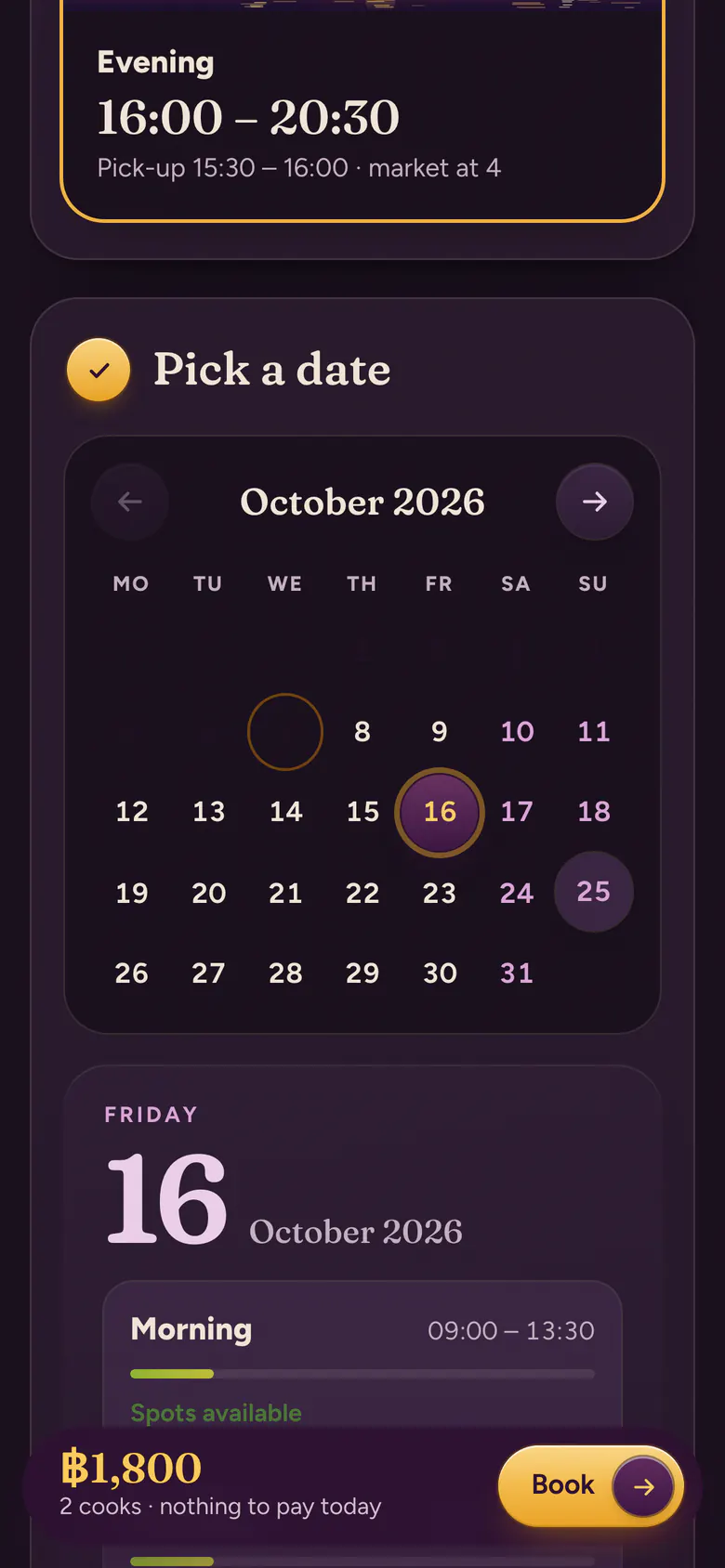
On small screens the same pieces rearrange rather than shrink: dish cards sit in a swipeable row, ‘Your menu’ docks as a slim bar, and the booking total and button stay pinned to the bottom of the screen.
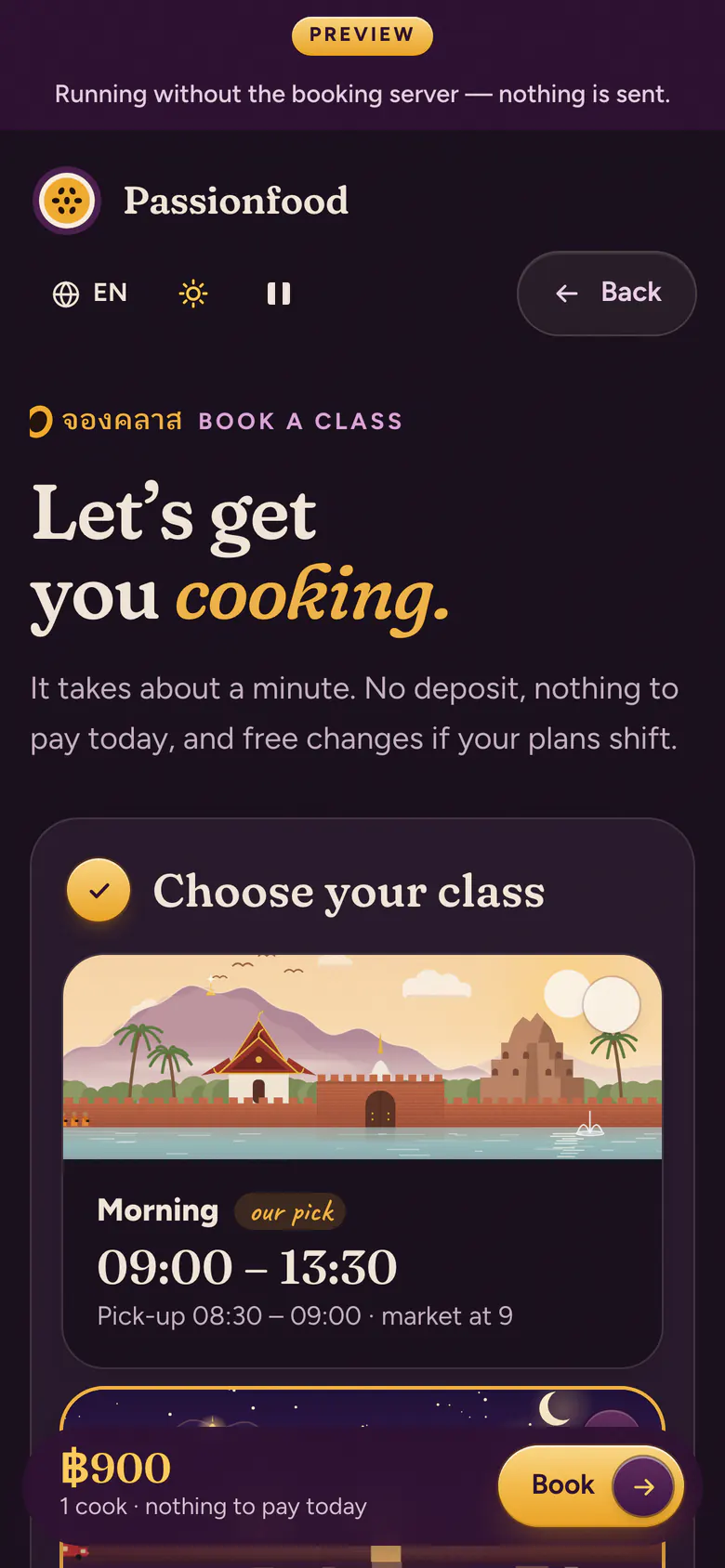
Booking page on a phone, dark theme, under a ‘Preview: running without the booking server, nothing is sent’ banner, with a pinned bar showing 900 baht and a Book button.
Fig. 6 Preview banner and pinned total.
Date step on a phone, dark theme: an October 2026 calendar with the 16th selected and a pinned bar showing 1,800 baht for two cooks.
Fig. 7 Picking a date.

Prototype status

Works in the demo

  • Menu picks & taste barsYes
  • Cookbook19 dishes
  • Morning / evening switchYes
  • Light & dark themesYes
  • LanguagesEN · ไทย · 简体中文
  • MotionPause control, reduced motion

Not part of it

  • Booking serverNone, nothing is sent
  • PaymentsNone
  • Client relationshipNone, independent concept
ApproachServices

Every page should answer the next question.

C Studio is the independent practice of Ceyvion Biggs. Starting with cooking schools, I organize class information, menus, schedules and booking details into websites that are clear to explore and easy to use.

  1. Website design & development

    Designed and built around how your classes actually run.

  2. Interactive menus & class selection

    Let visitors browse dishes and compare classes before they commit.

  3. Booking-flow prototypes

    Try a booking journey in the browser before connecting it to a real system.

  4. Small web tools

    Focused pieces that do one job well: a planner, a timetable, a picker.

Let’s talkEmail

Running a cooking school? Tell me what feels harder than it should.

Opens your mail app. There are no forms on this site.